

Pulling up to your car with both hands full of groceries and realizing your keys are buried somewhere in your bag is a universal frustration. It's the kind of moment that makes newer technology like Hyundai Digital Key feel less like a luxury and more like a practical upgrade. But if you've been using a traditional key fob without issue, switching to your smartphone as a car key raises fair questions about security, what happens when your phone dies, and whether it actually simplifies your life.
Both systems have real merits, and the better choice depends almost entirely on how you use your car day to day. If you're already curious about which current Hyundai models offer Digital Key 2, you can browse our new inventory to start narrowing your options.
What Is Hyundai Digital Key 2?
Hyundai Digital Key 2 is a system that turns your smartphone into a fully functional car key. You can unlock and start your Hyundai without touching a key fob at all. It builds on the original version with more advanced technology, broader device compatibility, and improved hands-free functionality.
How It Works: NFC, UWB, and the MyHyundai with Bluelink App
The system runs on two communication technologies: Near Field Communication (NFC) and Ultra-Wideband (UWB). NFC works similarly to contactless payment. You tap your phone against the door handle and the vehicle responds. UWB goes a step further by enabling passive entry, meaning the car detects your presence as you approach and unlocks automatically, without any tapping required.
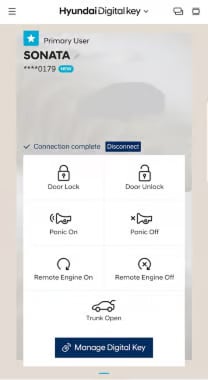
Everything runs through the MyHyundai with Bluelink app, where you set up the digital key, adjust permissions, and share access with other drivers. Activation can happen through the app itself, a URL link, or a code entered through the infotainment system. The app gives you control over things a traditional key fob simply can't offer.
What Is a Traditional Key Fob and How Does It Work?
The traditional Hyundai key fob has been the standard for vehicle access for years, and it remains reliable for good reason. It uses radio frequency (RF) signals to communicate wirelessly with your car's locking and ignition systems. On equipped models, you can unlock doors by pressing a button or simply by having the fob in your pocket while reaching for the handle.
The typical fob covers door lock and unlock, trunk release, remote start on compatible models, and a panic alert. It's a self-contained device that doesn't depend on your phone's battery, cellular connectivity, or app updates. That independence is part of what makes it feel dependable, even if it lacks the customization options of a digital key. If you ever need a replacement or have questions about key hardware, our Hyundai parts center can help.
Hyundai Digital Key vs. Traditional Key Fob: A Side-by-Side Comparison
When weighing these two options, the differences come down to how much you value convenience versus straightforward reliability. The table below captures the key distinctions at a glance.
| Feature | Hyundai Digital Key 2 | Traditional Key Fob |
|---|---|---|
| Primary device | Smartphone or smartwatch | Physical fob |
| Lock/unlock | NFC tap or UWB passive entry | Button press or proximity |
| Start vehicle | Via phone or app | Button press |
| Sharing access | Up to 3 users via app | Hand off physical fob |
| Setup | MyHyundai with Bluelink app required | No setup needed |
| Backup use | Keep key fob as fallback | Works on its own |
| Convenience | High for phone-first users | Simple, no app dependency |
| Familiarity | Newer, some learning curve | Long-established, intuitive |
Convenience and Daily Use
For anyone who already lives on their phone, the digital key is a genuine upgrade. There's no separate device to carry. You approach the car, it unlocks, you get in. The system also supports smartwatch integration on compatible devices, which extends that convenience even further.
Sharing vehicle access is also dramatically simpler with Hyundai Digital Key 2. Instead of handing over the key fob and coordinating its return, you grant access through the app, set parameters around it, and revoke it just as easily. For North Texas households with multiple drivers, this flexibility is genuinely useful rather than just a novelty.
Security: How Each Option Protects Your Vehicle
Traditional key fobs use encrypted RF signals, but they aren't immune to relay attacks, where thieves amplify the fob's signal from inside your home to trick your car into unlocking. It's a known vulnerability worth considering.
Hyundai Digital Key 2 addresses this with encrypted communication and device-level authentication. Since the system is tied to your specific phone and secured through your device's existing biometric locks, such as a fingerprint or face ID, unauthorized access becomes significantly harder. The digital key inherits the solid security features already built into your smartphone, adding layers that a standalone fob can't replicate.
What Happens When Your Phone Dies or Loses Signal?
If your phone battery dies at an inconvenient moment, you need a plan. The digital key depends on your device's power and, for some functions, its network connection. That's a real limitation compared to the key fob, which works as long as its own battery holds out.
Some NFC functions can still operate when a phone is in reserve power, but the key fob provides a fail-safe the digital key can't. The practical solution most Hyundai owners settle on is keeping the key fob accessible as a backup rather than discarding it entirely.
Phone Compatibility: iPhone, Samsung, and Google Devices
Hyundai Digital Key 2 is supported on select Apple, Samsung Galaxy, and Google devices. Compatibility varies depending on your specific phone model and software version, so checking the MyHyundai with Bluelink app requirements before relying on the feature is a smart step. If you're upgrading your phone or your vehicle at the same time, confirming compatibility upfront saves a lot of frustration. Never assume it works with all devices from a given brand. Verify before you commit.
Key Sharing and Family Access with Hyundai Digital Key 2
One of the strongest arguments for Hyundai Digital Key 2 over a traditional key fob is how it handles shared access. Families and anyone who regularly shares a vehicle benefit from having a system that manages multiple users with individual settings rather than passing around a single device.
Sharing Access with Up to Three People
The primary user can share digital key access with up to three additional drivers through the MyHyundai with Bluelink app. You can set permissions specific to each person and revoke access at any time without needing to physically retrieve anything. For a Plano family with a teen driver or a spouse who takes the car on alternating days, this is a meaningful practical benefit.
Why Keeping Your Key Fob Around Still Makes Sense
Even with the advantages of Hyundai Digital Key 2, holding onto your key fob is just sensible. Phones break, lose power at bad moments, or occasionally refuse to cooperate. Having a physical backup ensures you're never locked out of your own vehicle. Many Hyundai owners treat the digital key as their primary access method and the key fob as the backup, which gives you the best of both approaches.
Which Hyundai Models Support Digital Key 2?
Hyundai Digital Key 2 comes in two versions, and availability varies by model and year. Based on Hyundai's published compatibility list, Digital Key 2 Premium, which supports both NFC and UWB passive entry, is available on the 2024 Sonata and Santa Fe, and the 2025 IONIQ 5, IONIQ 5 N, Tucson, Santa Fe, Sonata, and Palisade. Digital Key 2 Touch, which uses NFC tap-to-enter, is available on the 2023 IONIQ 6 and Palisade, the 2024 Palisade, Elantra, IONIQ 6, and KONA, and the 2025 Santa Cruz.
Hyundai continues to add Digital Key support to newer model years, including select 2026 models, so this list may not reflect every currently equipped vehicle. Since availability is also version- and trim-specific, it's worth verifying which configurations include the feature when you're shopping. The team at Huffines Hyundai Plano can confirm which models in our inventory are equipped.
Which Option Is Right for You? Explore Hyundai Technology at Huffines Hyundai Plano
A lot of it comes down to your daily habits and how you share your vehicle. If you're constantly on your phone, share your car regularly, or prefer fewer physical items to manage, Hyundai Digital Key 2 is worth exploring seriously. If you value simplicity, rarely share vehicle access, or aren't ready to depend on your phone for something as fundamental as getting into your car, the traditional key fob remains a completely solid choice.
For most drivers, it doesn't have to be one or the other. Hyundai Digital Key 2 works best as the primary method with the key fob kept as a reliable backup, giving you both the convenience of modern technology and the reassurance of something physical when you need it.
At Huffines Hyundai Plano, located at 909 Coit Road in Plano, our team can walk you through which current Hyundai models include Digital Key 2 and help you find a trim that fits both your technology preferences and your budget. You can also check our current service offers while you're planning your visit. No pressure. Just clear information to help you make the right call. Contact us online or stop by to schedule a test drive and see Hyundai's latest technology in person.


